

Most teams assume that if a chat app is encrypted, then pasting a password in a direct message is fine. In practice, encryption in transit or at rest does not stop passwords from leaking through indexing, previews, exports, devices, and human workflows. If you want to keep credentials out of breach reports and audit findings, you have to minimize their lifetime and footprint, not just rely on the word encrypted.
What “encrypted” usually means in chat apps
Encryption is a baseline, but it is not a guarantee that secrets will not persist or spread.
- Transport and at rest encryption: Most business chat platforms encrypt data on the wire and on their servers. This protects against some network and storage threats, but providers and admins can still access content under certain conditions.
- Not all messages are end to end encrypted: Slack and Microsoft Teams are not end to end encrypted for normal messaging. They index and make messages searchable by design. Admins can use eDiscovery and legal hold to export message content.
- End to end encrypted apps still expose content on endpoints: Even when an app is end to end encrypted, messages are decrypted on user devices, cached locally, and displayed in notifications. That is enough for a leak.
For details, see Slack’s documentation on data exports and discovery APIs and Microsoft’s documentation for Teams eDiscovery and retention. These capabilities exist to help enterprises meet legal duties, but they also mean your password paste probably lives far longer than you intend.
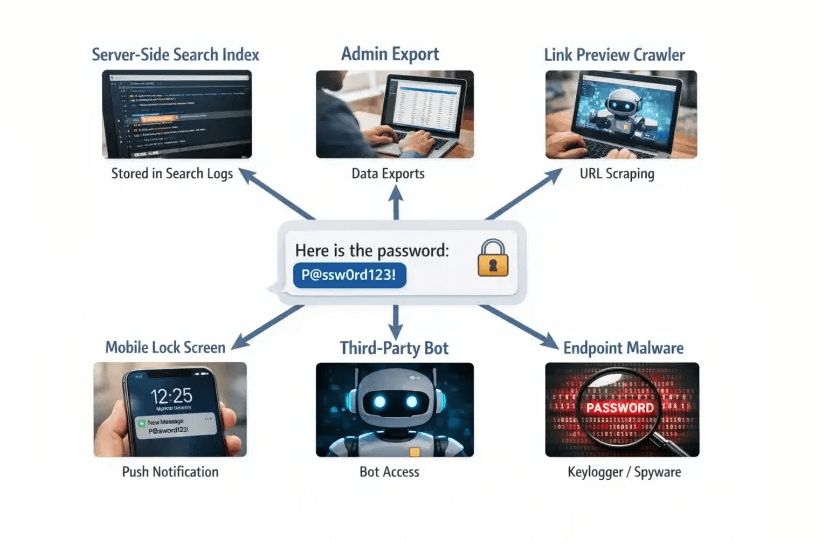
Nine real-world ways encrypted passwords leak in chat
- Server-side search and indexing: Business chat tools index messages so you can find them later. That index is exactly what you do not want for credentials, because it preserves and magnifies sensitive terms.
- Admin access, eDiscovery, and legal hold: Company administrators can export messages or place entire workspaces on hold. Your DM is now part of a durable archive.
- Retention policies and backups: Even short retention settings often allow for holds, litigation exceptions, or indirect backups. Content sticks around in places you do not control.
- Link previews and URL scanners: Chat apps and security gateways fetch URLs to render a preview or to scan for threats. That automated visit can consume one-time links or expose context to another system if the tool is not preview-safe.
- Third-party bots and integrations: OAuth apps in your workspace can read messages within scopes you approved. If a bot has read access in that channel, your secrets may be ingested into another vendor’s system.
- Notifications and lock screens: Passwords appear in desktop toasts, mobile banners, and smartwatch glances. Those notifications are visible to anyone nearby and can be captured in screenshots and system logs.
- Endpoint compromise and local caches: Malware on a recipient laptop, a shared family tablet, or unmanaged BYOD devices can read decrypted chat histories, SQLite caches, and notifications.
- Screen shares and meeting recordings: Pasted passwords show up on shared screens, then on cloud recordings with transcription.
- Human error and copy sprawl: People forward passwords to the wrong channel, paste them into tickets, or save them in meeting notes. Encryption does not stop mistakes.
But our messages are end to end encrypted. Are we safe?
End to end encryption solves a server trust problem, but it does not solve endpoint and workflow problems. An attacker only needs one compromised recipient device, one screenshot, or one synced backup to capture the secret. E2EE also does not prevent a well-meaning teammate from copying the credential into a ticketing system where it will live forever.
“We encrypt the password before we send it” can still fail
Teams sometimes paste an encrypted blob or a password protected zip into chat and send the decryption key in the next message. That creates two durable artifacts in one search index. It is trivial for an internal admin, a future export, or an attacker with chat access to pair the two messages.
Other patterns to avoid:
- Base64 is not encryption. Encoding is reversible by design.
- Reusing a shared passphrase across many exchanges. Once the passphrase appears in a chat log, past and future blobs are at risk.
- Long TTL links to files. The longer a secret exists, the more likely it leaks or is indexed.
The safer pattern: minimize lifetime and footprint
Security improves when you stop delivering secrets as durable messages and instead deliver access that is brief, single use, and unreadable to the platform carrying it.
A practical approach that fits modern Zero Trust:
- Encrypt on the sender’s device, not the server, so the delivery platform never sees plaintext.
- Share as a one-time, self-destructing link with a short expiration window.
- Send context and the link on separate channels, and verify the recipient out of band.
- Rotate or revoke the credential after first use or within a defined TTL.
- Keep an audit trail of access events without storing the secret itself.
This is exactly the workflow tools like Nurbak enable, using client-side AES-256 encryption and a zero-knowledge architecture. Secrets are encrypted locally, delivered through one-time links, and permanently deleted after being read, so plaintext is never stored or logged by the service.
If your team still prefers to share via a chat message, make the message contain only a dead link that will destroy itself on first open rather than the credential. Your chat history remains harmless.
Handle link previews, scanners, and robots correctly
Link unfurlers and security scanners can fetch URLs automatically. That can inadvertently consume a one-time link before a human sees it. To reduce risk:
- Use a tool that is preview-safe or provides guidance for avoiding unfurls, for example by detecting common preview user agents or providing a no-preview mode.
- Where your chat app allows it, disable link previews for the message or the channel used to transmit secrets.
- Avoid posting the same secret link in multiple places. One place, one recipient, one open.
Nurbak addresses link preview and scanner risks in its guidance and implementation. For step by step operational tips, see the guide on how to share a secret with one-time links.
Quick comparison of exposure paths
| Vector | Chat messages, even if encrypted | One-time, client-side encrypted link |
|---|---|---|
| Server visibility | Providers and admins can access or export content under policy | Zero knowledge, server stores ciphertext only and never sees the key |
| Retention | Indexed, searchable, and often preserved under legal hold | Self destructs after one view or short TTL, minimal retention by design |
| Link previews and scanners | Automated fetchers can read or copy content | Properly designed links resist previews or expire on first automated fetch |
| Admin or legal export | Included in exports and eDiscovery | Useless in exports because the secret no longer exists |
| Endpoints and notifications | Password text appears in notifications and local caches | Only the recipient’s device ever sees plaintext and only once |
| Auditability | Harder to prove controlled access to a specific secret | Access events can be audited without storing the secret |
What to require from a secret sharing tool in 2026
- Client-side encryption with strong, modern cryptography like AES-256, so plaintext never touches the server.
- Zero-knowledge architecture and one-time access links, so the provider cannot read the secret and it self destructs on first view.
- Short expirations by default and the ability to burn after reading, to minimize exposure windows.
- No data logging or storage of plaintext. Any metadata should be minimized.
- Audit access logs for accountability and incident response without sacrificing privacy.
- Admin dashboard and analytics that let you enforce policy and see usage patterns.
- Integration with your existing infrastructure and controls.
- Clear guidance or protections for link previews and URL scanners.
- Alignment with major regulations and frameworks your auditors expect.
Nurbak was built for this exact need. It provides self-destructing encrypted links, AES-256 client-side encryption, zero-knowledge delivery, one-time access links, audit access logs, and enterprise controls like an admin dashboard and analytics. It integrates into existing workflows across multiple industries and supports compliance efforts by reducing persistent copies of sensitive data.
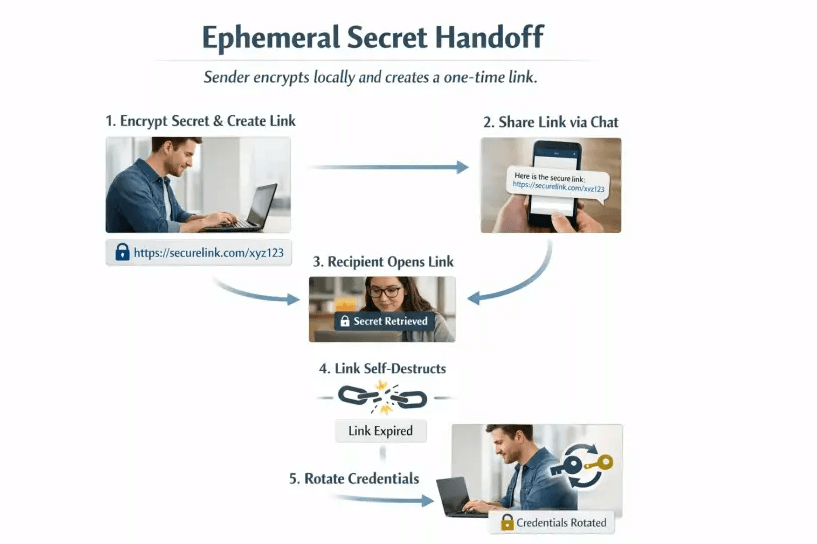
A short operational playbook your team can adopt this week
- Update policy: Ban plaintext secrets in chat, email, tickets, and docs. The only approved method is one-time, client-side encrypted links with short expirations.
- Standardize the workflow: Create the one-time link, deliver it, confirm receipt, and rotate. This should be the default for passwords, API keys, recovery codes, and private keys.
- Train for previews: Teach senders how to avoid link unfurls in your primary chat and to use preview-safe tools.
- Monitor and measure: Use audit access logs and admin analytics to confirm the practice is being followed and to support incident response.
When chat is still part of the conversation, make it carry dead data
Chat apps are great for coordinating people, not for carrying secrets. If your security model assumes that encryption alone will save a password pasted into a DM, you are leaving a trail attackers, insiders, and auditors can follow. The fix is not more encryption on the same channel. It is sending less, for less time, through a zero-knowledge path designed to vanish on first use.
If you want to see how this works in practice, try creating a one-time, zero-knowledge link with Nurbak. Or, dive deeper into related guides:
- Why Slack and Microsoft Teams Are Not Safe for Passwords
- How to share a secret with one-time links
- Client-Side vs. Server-Side Encryption: Why It Matters for Your Secrets
- The safest way to share an API key
- AES 256 encryption explained for non engineers
References for further reading:
- Slack Help Center, Export data from Slack and Discovery API documentation
- Microsoft Learn, Overview of eDiscovery and retention in Microsoft 365
- OWASP Secrets Management Cheat Sheet
Take the durable secret out of your chat logs, and your future self, your customers, and your auditors will thank you.