

Pasting a password, API token, or recovery code into email or chat creates a permanent record. Those messages are searchable, backed up, and visible to more people than you think, including administrators and eDiscovery. One-time links solve this problem by making your secret viewable a single time, then unrecoverable.
This guide shows how to share a secret with one-time links, the security practices that matter, and how teams can operationalize the approach without slowing work down.
What a one-time link actually does
A one-time link is a unique URL to a single-use, encrypted payload. When designed with zero-knowledge security, the secret is encrypted locally in your browser before it ever leaves your device, so the service provider cannot read it. After the first successful open, the encrypted payload is destroyed and the link becomes useless. This removes long-lived exposure in inboxes and chat logs.
Nurbak provides one-time, self-destructing links with client-side AES-256 encryption, a zero-knowledge architecture, and no content storage. For teams that need traceability, Nurbak also offers audit access logs without retaining the secret itself, plus an admin dashboard for governance and analytics.
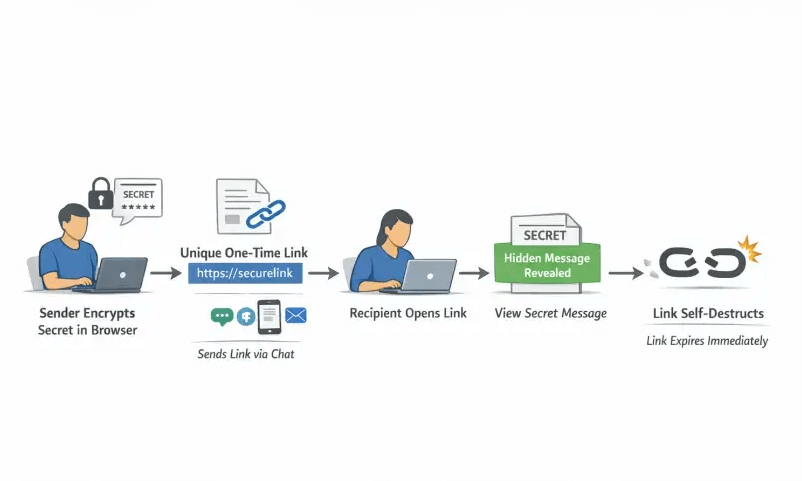
Step-by-step: share a secret with a one-time link
- Prepare the secret: Keep only what is necessary, do not bundle multiple credentials in one message, and never include sensitive context like personal identifiers alongside passwords.
- Choose a secure tool: Prefer solutions with proven client-side encryption, zero-knowledge design, one-time access, and minimal metadata retention. Nurbak meets these criteria and supports enterprise controls and integrations.
- Create the link: Paste the secret into the tool and generate a one-time link. If your tool offers options like expiration or view limits, set them according to the sensitivity and urgency of the transfer.
- Send the link and the context over separate channels: Share the link in one channel and the explanation or username in another channel to reduce risk if one channel is compromised.
- Confirm receipt and clean up: Ask the recipient to confirm they opened the link and stored the secret securely. Delete any local notes or screenshots you created during transfer.
- If the link is already burned, regenerate: One-time links are meant to fail closed. If a scanner or unintended party opened it first, create a new link and try again with precautions below.
Recipient's quick checklist
- Open the link once, then copy the secret into your password manager immediately.
- Do not forward the link or paste the secret back into chat or email.
- If the link shows expired or already viewed, ask the sender to resend a new link.
- For credentials, change the password after first login if policy requires it.
Best practices that prevent accidental leaks
- Use out-of-band verification, confirm the recipient's identity via a second channel before sending high-impact secrets.
- Split the data, send username and password in separate messages or channels. Treat recovery codes like root passwords.
- Beware link previews and scanners, some systems prefetch URLs which can consume a one-time link. If this is common in your environment, instruct recipients to copy and paste the URL into a browser, and consider disabling previews where possible.
- Avoid SMS for sensitive secrets, it is vulnerable to SIM swap and interception. NIST notes risks of SMS for authentication messages, see NIST SP 800-63B.
- Keep transfers short lived and tracked, for regulated environments, maintain an audit trail of access attempts without storing the secret content.
- Store long term in a vault, one-time links are for delivery, not storage. After receipt, the secret belongs in a password manager or secret manager.
Common mistakes to avoid
- Emailing the actual secret instead of a one-time link, this leaves a durable copy in mailboxes and backups.
- Sharing screenshots of credentials, images tend to persist in galleries and cloud sync.
- Reusing the same link with multiple recipients, one-time means one person, one view.
- Not telling the recipient what to do next, always instruct them to store the secret securely and not to reply with it.
How one-time links compare to other methods
| Method | Persistence | Who can access later | Upside | Main risk |
|---|---|---|---|---|
| Email body or attachment | High | Anyone with inbox, archive, or eDiscovery | Ubiquitous | Permanent, searchable exposure |
| Chat apps (Slack, Teams) | High | Workspace members, admins, exports | Fast | Indexed history, previews, bot fetches |
| SMS | Medium | Carrier, device backups, SIM swap attackers | Works without apps | Interception and number takeover |
| Password manager share | Medium | Intended recipient and vault admins | Strong E2E storage | Both sides may need same ecosystem |
| One-time link (Nurbak) | Very low | Only first opener | Ephemeral by design, zero-knowledge possible | Link scanners can consume the view if not mitigated |
For deeper context on chat risks and compliance, see our guides on why Slack and Teams are not safe for passwords and SOC2 password sharing in remote teams.
Security references worth knowing
- NIST warns that SMS has security limitations for authentication due to interception and redirection risks, see NIST SP 800-63B.
- OWASP recommends strong secret handling processes, least exposure, and purpose-built tooling, see the OWASP Secrets Management Cheat Sheet.
Real-world workflows
Onboarding a new hire with recovery codes
HR or IT generates backup codes, places them in a one-time link, and sends the link in chat while sharing instructions in a separate email. The employee confirms receipt and stores the codes in their password manager. For a complete walkthrough, read How to Securely Send 2FA Recovery Codes to Employees.
Giving a vendor temporary database access
Share the database password through a one-time link and the non-sensitive connection string in a different channel. Ask the vendor to rotate the password at the end of the engagement.
Finance sharing wire instructions
Provide sensitive account details via a one-time link and confirm the payee identity on a separate call. This reduces the risk of business email compromise and invoice fraud.
Frequently Asked Questions
Are one-time links safe? When implemented with client-side encryption and a zero-knowledge design, one-time links are a strong way to deliver secrets because the provider cannot read the plaintext and the data self-destructs after first use.
What if a link scanner or preview burns the link? Generate a new link and share it again with precautions. Consider disabling previews in your chat, and ask the recipient to copy and paste the URL into a browser instead of clicking inside the chat app.
Should I add a passphrase to the link? If your tool supports an additional passphrase, use it and deliver the passphrase over a different channel. This adds a second factor for decryption.
Can I audit access without storing secrets? Many enterprise-grade tools, including Nurbak, provide high-level access logs so you can verify that a link was opened, without retaining the secret content.
Is this approach compliant with SOC2 or ISO 27001? One-time links can help reduce data persistence and support access control principles. See our guide to SOC2 and password sharing for remote teams and consult your auditor for specifics.
What should the recipient do after opening the link? Store the secret in a password manager or secret manager and, if required by policy, rotate the credential on first use. Never paste it back into email or chat.
Bring one-time links to your team with Nurbak
Nurbak makes it easy to share a secret securely using encrypted, self-destructing links. With AES-256 client-side encryption, a zero-knowledge architecture, no content storage, one-time access links, audit access logs, admin dashboard and analytics, and options to integrate with your existing infrastructure, it is built for teams that care about both security and usability.
Try secure one-time links today at Nurbak.