

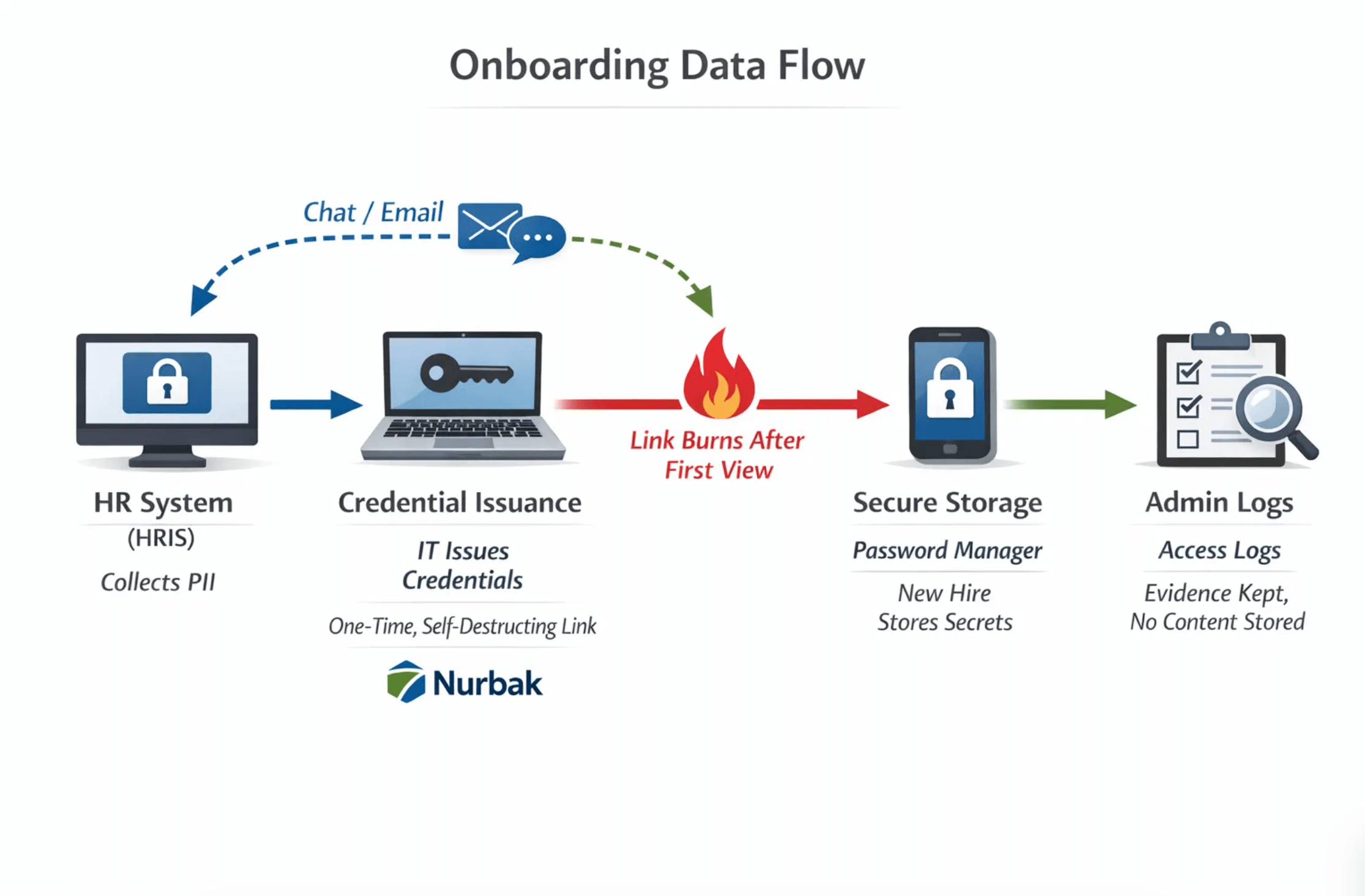
Most companies focus on speed during onboarding, but the first days are also when sensitive data is most exposed. HR collects personal information, IT issues initial credentials and 2FA recovery codes, engineering hands out API keys or environment variables, and finance sets up payroll details. If those items land in email threads or chat logs, they persist for years, turning routine onboarding workflows into high‑value targets.
This guide shows how to handle sensitive data during onboarding with a zero‑trace approach. You will see where the biggest risks appear, which controls actually reduce exposure, and how to operationalize one‑time, self‑destructing links for human‑to‑human secret sharing.
Why onboarding is a high‑risk moment for sensitive data
Onboarding compresses many sensitive exchanges into a short time window. That concentration is convenient for attackers and also creates long‑lived liabilities in your systems of record.
Typical risk multipliers:
- Multiple teams touch the same individual data, which creates duplication and increases blast radius.
- Email and chat histories are persistent and searchable, which conflicts with data minimization and right to erasure.
- First‑time login and recovery flows involve secrets that are often delivered out of band or by people unfamiliar with secure handling.
Regulators and standards setters point to the same core ideas: minimize what you keep and delete what you do not need. GDPR Article 5 highlights data minimization and storage limitation principles, while NIST guidance emphasizes strong authentication lifecycle management and secure transmission. See GDPR Article 5 principles of processing and storage limitation, and NIST SP 800‑63B for authentication lifecycle guidance. References: GDPR Article 5, NIST SP 800‑63B, NIST SP 800‑53 Rev. 5, OWASP Secrets Management Cheat Sheet.
What counts as sensitive during onboarding
Sensitive data is not only passwords. In onboarding workflows you will commonly handle:
- Identity and payroll PII, for example government IDs, home address, tax forms, bank account and routing numbers.
- Authentication artifacts, for example initial passwords, 2FA recovery codes, time‑based OTP seeds, backup codes.
- Access credentials, for example SSO bootstrap tokens, VPN and Wi‑Fi PSKs, device local admin passwords, vault bootstrap tokens.
- Developer secrets, for example API keys, environment variables, service account tokens, signing keys.
- Third‑party integrations, for example vendor console invites and temporary cross‑tenant credentials.
Treat every item in this list as a secret with a short half‑life and the potential to unlock other systems if mishandled.
Failure modes to eliminate from day one
- Emailing passwords or 2FA recovery codes, because mailboxes and backups persist and are broadly accessible to admins.
- Dropping secrets into Slack or Teams, because chat logs are indexable and previews sometimes render content.
- Storing secrets in ticketing systems, because tickets are often shared across departments and retained for audits.
- Using public pastebins or ad‑supported note links, because many are unencrypted and scraped by bots.
If any of these are in your current SOPs, replace them with ephemeral, one‑time delivery using a zero‑knowledge tool and require immediate rotation after first use.
For background on chat risks and safer patterns, see Why Slack and Microsoft Teams Are Not Safe for Passwords.
Operating principles for sensitive onboarding data
- Minimize, collect only what you must, avoid copying across systems, and avoid screenshots.
- One‑time access, deliver secrets through single‑view, self‑destructing links.
- Zero‑knowledge, ensure encryption happens in the sender’s browser and the provider cannot read content.
- Short exposure window, expire links quickly if they are not opened and rotate secrets immediately after use.
- Separation of channels, use chat or email for coordination and an ephemeral link for the actual secret.
- Verify the recipient, confirm identity out of band before sharing first‑use credentials.
- Keep proof without content, retain evidence of delivery and access events, never store the secret itself.
A client‑side encrypted approach aligns with these principles. For a short primer on why zero‑knowledge matters, read Client‑Side vs. Server‑Side Encryption: Why It Matters for Your Secrets.
A practical blueprint you can adopt this quarter
1) Map onboarding touchpoints that handle sensitive data
List each step where HR, IT, Security, Engineering, and Finance create, transmit, or store sensitive items. Identify the origin system, who needs to receive it, and where it must not persist.
2) Assign an owner, a secure transfer method, and a deletion deadline
Use the table below as a starting point. Adapt it to your stack.
| Onboarding item | Owner | Secure transfer pattern | Recommended retention at sender | Evidence to keep |
|---|---|---|---|---|
| Initial account password or bootstrap code | IT | One‑time, self‑destructing link, verify identity separately | Destroy once shared and rotated | Access event record, ticket note that rotation completed |
| 2FA recovery codes | IT, Security | One‑time, self‑destructing link, instruct recipient to store in password manager | Destroy after confirmation of storage | Access event record, acknowledgment from recipient |
| API key or environment variables | Engineering | One‑time, self‑destructing link to the developer, scope key to least privilege | Do not keep a copy after delivery | Access event record, change log showing key creation and scope |
| Bank details for payroll | HR | Use secure HRIS portal for collection, avoid email, if you must transmit internally use an ephemeral link | No local copies, purge drafts | HRIS record, acknowledgment of setup |
| Temporary contractor credentials | IT | One‑time, self‑destructing link, rotate after task | Remove credential post‑task | Access event record, ticket note of deprovisioning |
For engineering and IT use cases, see two deep dives, The safest way to share an API key and Stop Hardcoding Secrets: How to Share API Keys and Environment Variables Securely.
3) Standardize delivery with a zero‑trace tool
Nurbak provides one‑time, self‑destructing encrypted links with a zero‑knowledge design, so secrets are encrypted in the browser and the server does not see plaintext. Features include AES‑256 encryption, one‑time access links that burn after reading, audit access logs, an admin dashboard and analytics, and integrations that fit existing infrastructure. Using a single tool across HR, IT, and Engineering simplifies your SOPs and reduces exceptions.
4) Teach recipients what to do after the first view
A secure handoff also depends on the recipient. Include these instructions in every template you send:
- Open the link on a trusted device and network.
- Copy the secret into your password manager, do not screenshot it.
- Confirm back to the sender, the link will self‑destruct and cannot be reopened.
For 2FA recovery codes specifically, share with a one‑time link and have the employee store them immediately. Detailed steps are in How to Securely Send 2FA Recovery Codes to Employees.
5) Rotate or revoke promptly
Treat first‑use items as temporary. After the recipient signs in, rotate to a new credential or enforce a password change on first login. For contractors and vendors, follow a create, share, rotate pattern and remove access at the end of the engagement. A concise playbook is in The SysAdmin Guide: How to Send Temporary Root Credentials to External Contractors.
Role‑specific onboarding SOPs
HR, handling personal data and payroll set‑up
Collect PII only through your HRIS or a secure intake form, not via email. If you must transmit a sensitive element to Finance or Benefits during set‑up, use a one‑time link and keep only the proof of access, not the content. Communicate to new hires that you will never ask for SSNs or bank details over chat. Align instructions with your privacy notice and data retention policy.
IT and Security, first‑use credentials and strong MFA
Deliver first‑time passwords, bootstrap codes, and 2FA recovery codes via one‑time links, and enforce rotation on first use. Disable link previews for your one‑time link domain inside your chat platform, and avoid posting secrets in ticket bodies. Require an out‑of‑band identity check before sending the link, for example a brief video call or a call to a known number.
Engineering, developer keys and environment variables
Never paste secrets in commit messages, tickets, or chat. Scope API keys to least privilege and limit the environment variable set to what the new developer needs for day one. Deliver secrets with a one‑time link and rotate default tokens after the first successful pull or login.
Compliance alignment that reduces audit work
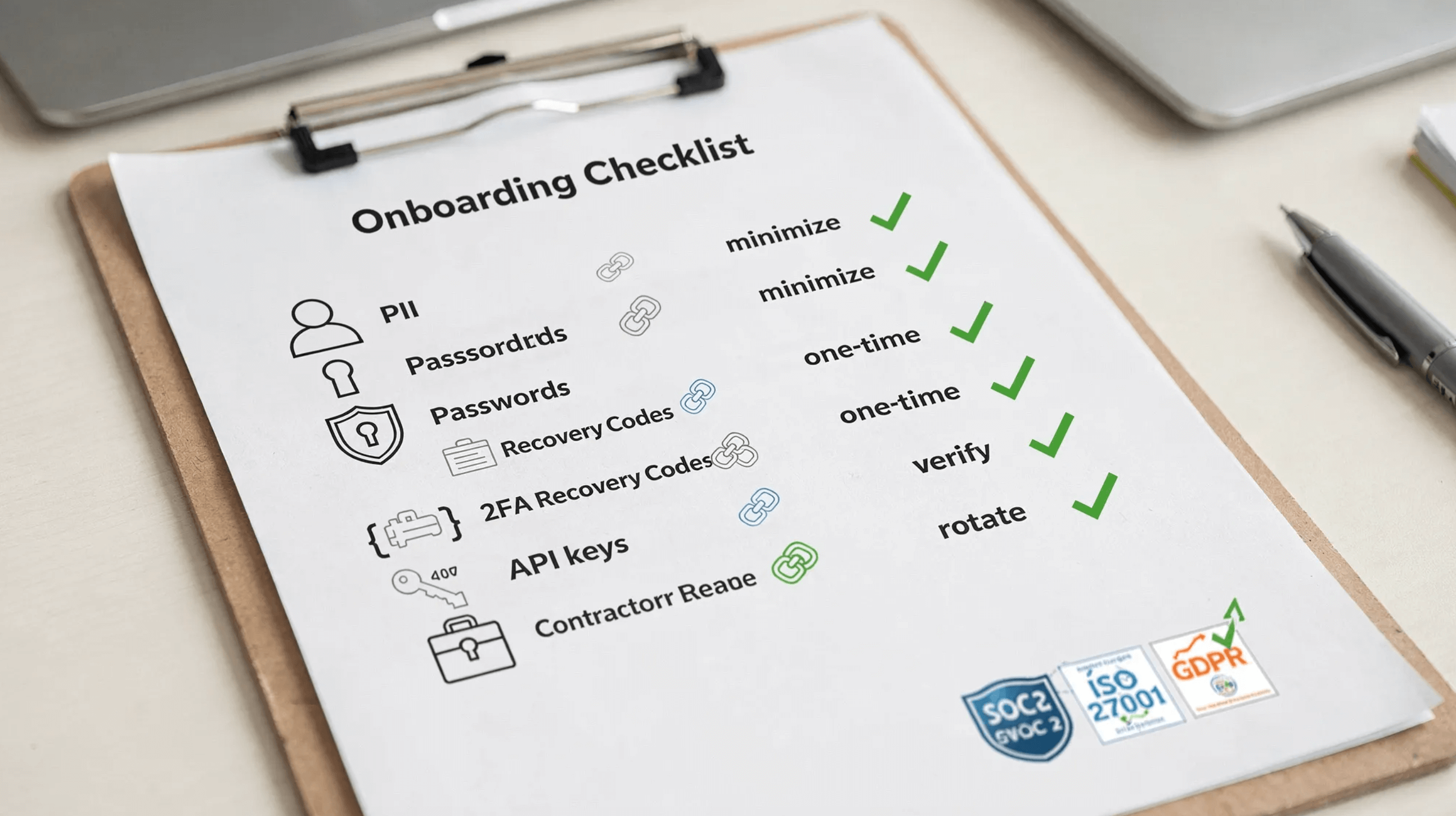
You can meet multiple requirements by building onboarding around minimization and ephemeral delivery.
- GDPR, data minimization and storage limitation, keep less and for shorter periods and simplify Right to Erasure requests. See GDPR Article 5.
- SOC 2, evidence that secrets were not stored long term, centralized control over how credentials are shared, and auditability of access events.
- ISO 27001, align with controls on information transfer and information deletion by avoiding persistent channels and using tools that do not store secret content.
- NIST, align with secure transmission and authentication lifecycle guidance in SP 800‑63B and transmission protection in SP 800‑53.
For a broader policy view, including how to reconcile privacy and security requirements, see Data security and data privacy: align your policies.
Implement in 30 days, a pragmatic rollout plan
Week 1, discover and decide
- Inventory onboarding touchpoints across HR, IT, Engineering, and Finance.
- Choose canonical channels for communication and for secret delivery. Adopt a no secrets in email or chat policy.
Week 2, standardize the pattern
- Roll out Nurbak for one‑time, client‑side encrypted secret delivery.
- Update onboarding runbooks and templates with recipient instructions and rotation steps.
Week 3, train and harden
- Train HR coordinators, IT admins, and hiring managers on the new SOPs.
- Configure your chat platform to avoid link unfurling for your one‑time link domain. Add a short explainer to your onboarding wiki.
Week 4, prove and improve
- Run a pilot with a new hire cohort. Use Nurbak’s admin dashboard and analytics to review adoption and exceptions.
- Capture evidence for auditors, for example access events and ticket notes confirming rotation.
Metrics that show your onboarding is safe by design
Track a small set of metrics that prove control and guide improvements:
- Share method adoption, percent of sensitive items delivered via one‑time links.
- Time to rotation, median time between first access and credential rotation.
- Residual exposure, number of secrets detected by DLP in email or chat during onboarding.
- Erasure effort, time required to fulfill a deletion request touching onboarding artifacts.
- Exceptions, count and reason for any deviation from the SOP.
Common pitfalls and how to avoid them
- Link forwarded or opened by the wrong person, mitigate with out‑of‑band identity verification and short validity windows.
- Device compromise on the recipient side, advise opening links only on a managed device and require immediate rotation.
- Screenshots of secrets, add do not screenshot language to templates and require storage in a password manager.
- Link preview bots, share one‑time links only in channels where previews are disabled for your domain or send the link via a channel that does not unfurl.
Where Nurbak fits
Nurbak is built for sensitive onboarding workflows. It combines client‑side AES‑256 encryption, a zero‑knowledge architecture, and one‑time, self‑destructing links so secrets leave no trace after delivery. The service does not store or log secret content, it provides audit access logs for evidence, and it includes an admin dashboard and analytics so you can operationalize this pattern across teams. Nurbak integrates with existing infrastructure and supports multiple industries, which lets HR, IT, and Engineering share a single, simple way to handle sensitive data during onboarding.
Adopting a zero‑trace onboarding standard reduces breach risk, lowers compliance overhead, and builds trust with new hires from their very first day. If you are ready to replace chat and email for secret delivery, try Nurbak at nurbak.com, and standardize your onboarding around one‑time, self‑destructing links.